3. First GET in Python and TypeScript
- Make a
GETfrom Python (httpx) and from TypeScript (fetch) and read status, headers and body. - Pass query parameters without writing them into the URL by hand.
- Understand the envelope of list responses:
items,meta,links. - Turn an error status into an exception (or an
if) instead of ignoring it.
Theory
Section titled “Theory”The two libraries
Section titled “The two libraries”Python: httpx |
TypeScript: fetch |
|
|---|---|---|
| Installation | pip install httpx |
none: built into Node ≥ 18 and browsers |
| Call | httpx.get(url, params=…, headers=…) |
await fetch(url, { headers }) |
| Status | r.status_code (int) |
r.status (number), r.ok (true if 2xx) |
| Headers | r.headers["content-type"] (case-insensitive dict) |
r.headers.get("content-type") |
| JSON body | r.json() → dict/list |
await r.json() → object/array |
| Text body | r.text |
await r.text() |
| Error on 4xx/5xx | no, until you call r.raise_for_status() |
no: fetch throws only on network errors; r.ok must be checked |
| Query string | params={"limit": 3} → automatic encoding |
new URL(...) + url.searchParams.set(...) |
The list envelope
Section titled “The list envelope”When you ask for a collection (/books, /authors, /orders…) this server — like many APIs — does not return a bare array but an object:
{ "items": [ … ], ← i dati veri "meta": { "page": 1, "limit": 3, "total": 80, "pages": 27 }, ← quanti sono, dove sei "links": { "self": "…", "next": "…?page=2&limit=3", "prev": null } ← come continuare}Why? A bare array cannot say “there are 77 more”. The envelope can, and it lets you add fields in the future without breaking clients. Single resources (/books/1), on the other hand, are just the object.
curl, explained
Section titled “curl, explained”curl -sS -G https://corso-api-json.giuseppebosi.com/api/v1/books \--data-urlencode 'limit=3' --data-urlencode 'sort=-price' | python3 -m json.tool- -G --data-urlencode
- the two parameters end up in the query string:
?limit=3&sort=-price - limit=3
- at most 3 elements on the page
- sort=-price
- sort by price; the leading
-= descending - | python3 -m json.tool
- reformats with indentation
{ "items": [ { "id": 12, "title": "Quello che resta di Sestri", "price": 34.49, … }, { "id": 79, "title": "Ustica e il Novecento", "price": 34.36, … }, { "id": 29, "title": "La cucina di Ustica", "price": 33.49, … } ], "meta": { "page": 1, "limit": 3, "total": 80, "pages": 27 }, "links": { "self": "https://corso-api-json.giuseppebosi.com/api/v1/books?limit=3&sort=-price&page=1", "next": "https://corso-api-json.giuseppebosi.com/api/v1/books?limit=3&sort=-price&page=2", "prev": null }}Python and TypeScript
Section titled “Python and TypeScript”# pip install httpx → python3 primo_get.pyimport httpx
r = httpx.get( "https://corso-api-json.giuseppebosi.com/api/v1/books", params={"limit": 3, "sort": "-price"}, # httpx costruisce e codifica la query string)print(r.status_code, r.headers["content-type"]) # 200 application/jsonr.raise_for_status() # se lo status è 4xx/5xx solleva httpx.HTTPStatusError: meglio fermarsi qui
dati = r.json() # dict Pythonprint("totale libri:", dati["meta"]["total"])for libro in dati["items"]: print(f'{libro["id"]:>3} {libro["title"]:<32} {libro["price"]:>6.2f} €')print("pagina successiva:", dati["links"]["next"])What you should see:
200 application/jsontotale libri: 80 12 Quello che resta di Sestri 34.49 € 79 Ustica e il Novecento 34.36 € 29 La cucina di Ustica 33.49 €pagina successiva: https://corso-api-json.giuseppebosi.com/api/v1/books?sort=-price&page=2&limit=3// node --experimental-strip-types primo_get.ts (Node 22; da Node 23 senza flag)const url = new URL("https://corso-api-json.giuseppebosi.com/api/v1/books");url.searchParams.set("limit", "3"); // URL costruisce e codifica la query stringurl.searchParams.set("sort", "-price");
const r = await fetch(url);console.log(r.status, r.headers.get("content-type")); // 200 application/jsonif (!r.ok) throw new Error("HTTP " + r.status); // fetch non lancia da solo sui 4xx/5xx
const dati = await r.json();console.log("totale libri:", dati.meta.total);for (const libro of dati.items) { console.log(String(libro.id).padStart(3), libro.title.padEnd(32), libro.price.toFixed(2), "€");}console.log("pagina successiva:", dati.links.next);What you should see:
200 application/jsontotale libri: 80 12 Quello che resta di Sestri 34.49 € 79 Ustica e il Novecento 34.36 € 29 La cucina di Ustica 33.49 €pagina successiva: https://corso-api-json.giuseppebosi.com/api/v1/books?sort=-price&page=2&limit=3Three things to notice:
- The parameters are not written into the URL by hand:
params=/searchParams.setencode them (a space becomes%20, a&inside a value becomes%26). r.json()is synchronous in Python; in JavaScript it returns a Promise and must be awaited (the body can arrive in pieces).- The status must be checked:
raise_for_status()andif (!r.ok). In chapter 7 we will do it properly.
A single resource
Section titled “A single resource”import httpxlibro = httpx.get("https://corso-api-json.giuseppebosi.com/api/v1/books/12").raise_for_status().json()print(libro["title"], "-", libro["attributes"]["format"]) # Quello che resta di Sestri - …What you should see:
Quello che resta di Sestri - brossuraraise_for_status() returns the response itself, so it can be chained.
const r = await fetch("https://corso-api-json.giuseppebosi.com/api/v1/books/12");if (!r.ok) throw new Error("HTTP " + r.status);const libro = await r.json();console.log(libro.title, "-", libro.attributes.format); // Quello che resta di Sestri - …What you should see:
Quello che resta di Sestri - brossuraTry it now
Section titled “Try it now”Response headers
Response headers
Exercise
Section titled “Exercise”Try it online, nothing to install:


The GET request straight in your browser: https://corso-api-json.giuseppebosi.com/api/v1/books?limit=3&sort=-price
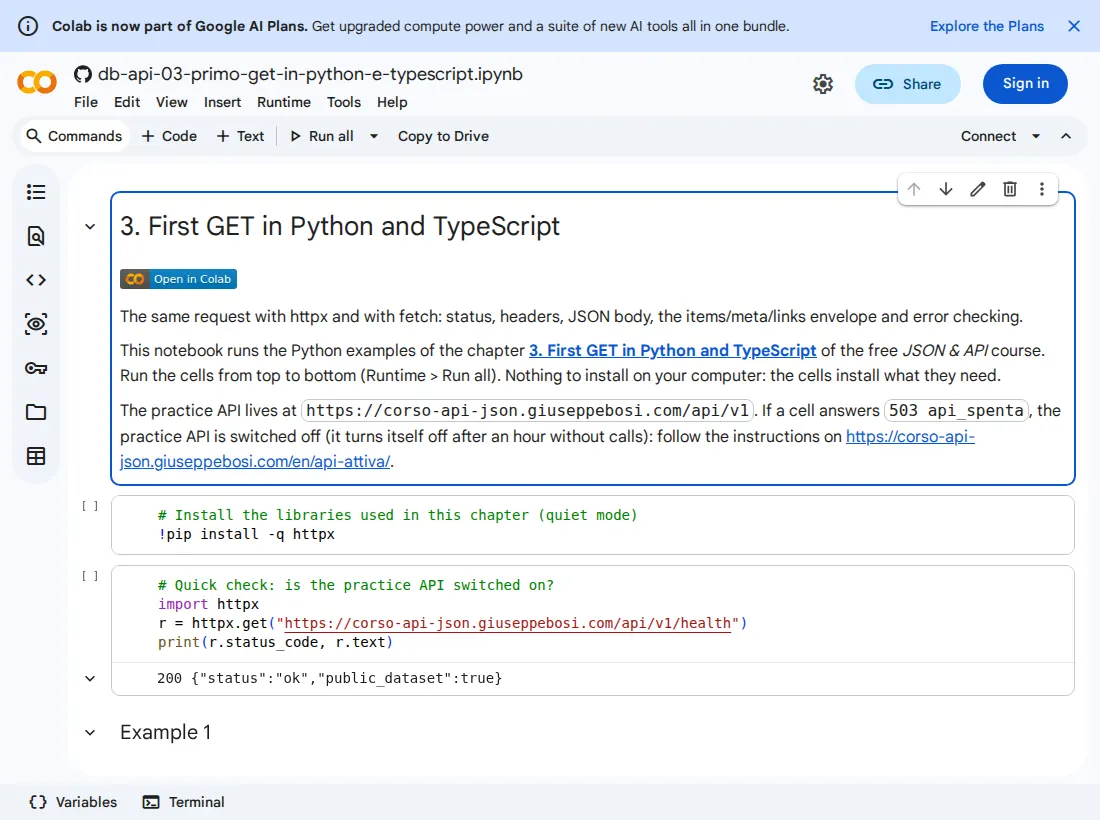
Python on Google Colab (a free Google account is needed to run the cells); TypeScript on StackBlitz (it opens and starts by itself in the browser). If the practice API is switched off, turn it on from /en/api-attiva/.
What you should see when the notebook opens:
Write a script that calls /api/v1/authors?limit=5 and prints, for each author, name, country and books_count. Then print how many pages there are in total (meta.pages). Bonus: call /api/v1/authors/9999 and watch what your script does without a status check.
Solution
import httpxr = httpx.get("https://corso-api-json.giuseppebosi.com/api/v1/authors", params={"limit": 5})r.raise_for_status()d = r.json()for a in d["items"]: print(f'{a["name"]:<20} {a["country"]} libri: {a["books_count"]}')print("pagine:", d["meta"]["pages"])What you should see:
Amélie Roux FR libri: 4Anna Kowalski PL libri: 4Beatrice Colombo IT libri: 4Chiara Bellini IT libri: 4Davide Moretti IT libri: 3pagine: 4Without raise_for_status(), /authors/9999 returns 404 and r.json() gives you {"error": {...}}: the script carries on and hits a KeyError later, far from the cause.
const r = await fetch("https://corso-api-json.giuseppebosi.com/api/v1/authors?limit=5");if (!r.ok) throw new Error("HTTP " + r.status);const d = await r.json();for (const a of d.items) console.log(a.name.padEnd(20), a.country, " libri:", a.books_count);console.log("pagine:", d.meta.pages);What you should see:
Amélie Roux FR libri: 4Anna Kowalski PL libri: 4Beatrice Colombo IT libri: 4Chiara Bellini IT libri: 4Davide Moretti IT libri: 3pagine: 4Without if (!r.ok), /authors/9999 throws nothing: d.error exists and d.items is undefined → a TypeError later on.
Common mistakes
Section titled “Common mistakes”- Building the URL with an f-string / template string and unencoded values:
f"...?q={testo}"withtesto = "le estati"sends a bare space. Useparams=/searchParams. - Forgetting
awaitonr.json()in JavaScript: you get a Promise, not the data. - Trusting an implicit 200: without
raise_for_status()/r.ok, a 404 looks like “strange data”. - Looking for the data in a list response as if it were an array:
dati[0]→KeyError; the books are indati["items"].
Summary
Section titled “Summary”httpx.get(url, params=…) and fetch(new URL(...)); status, headers, json(); the items/meta/links envelope; always check the status. In the next chapter we use the query string for real: filters, sorting, and a loop that walks through every page.